ETRI 법률 QA: AI 기반 법률 질문 응답 시스템 소개

.
ETRI 법률 QA란?
ETRI Legal QA는 AI 기반의 법률 질문 응답 시스템으로, 사용자가 입력한 질문에 대해 관련 법률 정보와 답변을 제공합니다. 이 시스템은 한국어로 작성된 법률 데이터를 학습하여 정확하고 신뢰성 있는 정보를 제공합니다.
- 핵심 기능:
- 사용자가 입력한 질문을 이해하고 적절한 답변 제공.
- 관련 법률 조항과 출처 정보를 포함한 상세 응답.
- RESTful API를 통해 다양한 애플리케이션에 통합 가능.
ETRI Legal QA API 사용 방법
ETRI Legal QA API를 활용하면, 사용자가 입력한 질문에 대한 답변을 애플리케이션에서 직접 확인할 수 있습니다. 아래는 React Native 기반의 애플리케이션에서 ETRI Legal QA API를 사용하는 예시입니다.
구현 코드: ETRI Legal QA API 호출 및 응답 처리
1. API 호출 함수 구현
API 호출을 위한 callETRILegalQA 함수를 정의합니다. 이 함수는 사용자가 입력한 질문을 ETRI Legal QA API에 전달하고, 그 결과를 반환합니다.
export const callETRILegalQA = async (inputText: string): Promise<any[]> => {
const ACCESS_KEY = "e3823862-6c18-4b7f-a9e7-676cad0daec2";
const requestBody = {
argument: {
question: inputText,
},
};
try {
console.log("API 호출 시작:", API_URL);
const response = await fetch(API_URL, {
method: "POST",
headers: {
"Content-Type": "application/json",
Authorization: ACCESS_KEY,
},
body: JSON.stringify(requestBody),
});
console.log("API 호출 완료");
if (!response.ok) {
const errorText = await response.text();
console.error(`HTTP Error: ${response.status} - ${response.statusText}`);
console.error("응답 내용:", errorText);
return [];
}
const data = await response.json();
console.log("전체 응답 데이터:", data);
// AnswerInfo 배열 추출
const answerInfo = data.return_object?.LegalInfo?.AnswerInfo;
if (answerInfo && answerInfo.length > 0) {
return answerInfo; // AnswerInfo 배열 반환
}
return []; // 빈 배열 반환
} catch (error: any) {
console.error("API 호출 에러:", error.message || error);
return [];
}
};
2. React Native UI 구현
import React, { useState } from "react";
import { Image, StyleSheet, Text, View, ScrollView } from "react-native";
import ParallaxScrollView from "@/components/ParallaxScrollView";
import { Box } from "@/components/ui/box";
import { Textarea, TextareaInput } from "@/components/ui/textarea";
import {
Button,
ButtonText,
} from "@/components/ui/button";
import { callETRILegalQA } from "@/src/api/LegalQA"; // API 함수 import
export default function HomeScreen() {
const [inputText, setInputText] = useState(""); // 입력 텍스트 상태
const [responseText, setResponseText] = useState<any[]>([]); // API 응답 상태
// 버튼 클릭 이벤트 핸들러
const handleButtonPress = async () => {
if (!inputText) {
setResponseText([{ answer: "질문을 입력하세요!" }]);
return;
}
const response = await callETRILegalQA(inputText);
setResponseText(response); // API 응답 저장
};
return (
<ParallaxScrollView
headerBackgroundColor={{ light: "#A1CEDC", dark: "#1D3D47" }}
headerImage={
<Image
source={require("@/assets/images/partial-react-logo.png")}
style={styles.reactLogo}
/>
}
>
{/* 응답 결과를 표시할 박스 컴포넌트 */}
<Box className="bg-gray-200 p-4 rounded-lg mt-4 ">
<ScrollView>
{responseText.length > 0 ? (
responseText.map((item, index) => (
<View key={index} style={styles.responseItem}>
<Text style={styles.responseAnswer}>{`답변 ${index + 1}: ${item.answer}`}</Text>
<Text style={styles.responseSource}>{`출처: ${item.source}`}</Text>
</View>
))
) : (
<Text className="text-typography-900 text-center">
질문에 대한 응답이 없습니다.
</Text>
)}
</ScrollView>
</Box>
{/* 텍스트 입력 필드 */}
<Textarea
size="xl"
isReadOnly={false}
isInvalid={false}
isDisabled={false}
className="w-128 mt-4"
>
<TextareaInput
placeholder="질문을 입력하세요..."
value={inputText}
onChangeText={(text) => setInputText(text)} // 입력 값 업데이트
/>
</Textarea>
{/* 버튼 컴포넌트 */}
<Button size="md" variant="outline" action="primary" onPress={handleButtonPress}>
<ButtonText>질문 보내기</ButtonText>
</Button>
</ParallaxScrollView>
);
}
const styles = StyleSheet.create({
titleContainer: {
flexDirection: "row",
alignItems: "center",
gap: 8,
},
stepContainer: {
gap: 8,
marginBottom: 8,
},
reactLogo: {
height: 178,
width: 290,
bottom: 0,
left: 0,
position: "absolute",
},
responseItem: {
marginBottom: 16,
padding: 10,
borderBottomWidth: 1,
borderBottomColor: "#ddd",
},
responseAnswer: {
fontSize: 16,
fontWeight: "bold",
color: "#333",
},
responseSource: {
fontSize: 14,
color: "#666",
},
});
주요 기능
- 사용자 친화적인 인터페이스: 사용자가 자연어로 질문을 입력하면, 시스템은 자동으로 ETRI API에 요청을 보냅니다.
- 실시간 응답: API로부터 받은 답변을 화면에 실시간으로 표시합니다.
- 관련 법률 조항 포함: 답변에 관련 법률 조항 및 출처 정보를 명확히 제공하여 신뢰성을 높입니다.
예시
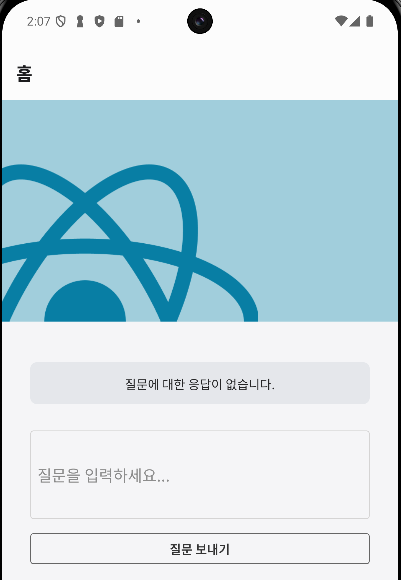
대충 만든 UI에 폭행죄 질문 보내보겠습니다 .
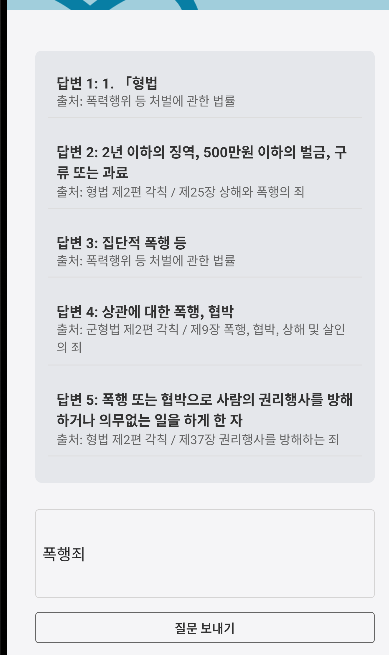
한국 법률에 기반해서 적절한 답변을 해줍니다
괜찮네요 하지만 단점이 있습니다 .
여기서 만약에 조금더 상세하게 다가가면
예를들어 내가 2대1로 맞짱을 떳는데 내가 받을 처벌이 어떻게 돼? 라고 질문해보겠습니다.
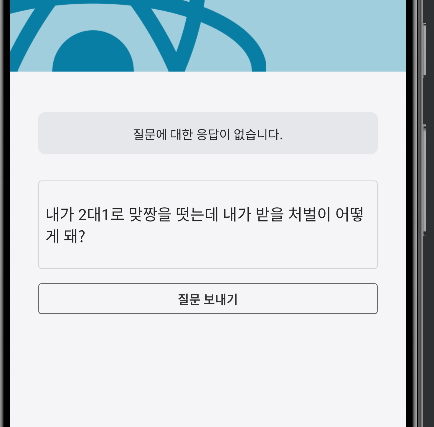
이런 경우에는 아예 응답이 안 옵니다. 정확한 사용법을 제가 모르는 걸 수도 잇겠네요 .
사용해보실 분들은
https://aiopen.etri.re.kr/guide/LegalQA 이 링크 들어가서 사용해보세용~
'API' 카테고리의 다른 글
| Codex CLI 사용법 및 오늘의 경험(android) (1) | 2025.04.20 |
|---|---|
| 🚀 YouTube Shorts 자동 생성 시스템 개편: 앱 홍보 최적화 및 안정성 강화! ✅ (0) | 2025.02.17 |
| 🚀 Moneyprinter V2 트위터 자동 업로드 시스템 변형 과정 (0) | 2025.02.17 |
| 🚀 MoneyPrinter YouTube Shorts 자동 업로드 테스트 기록 및 문제 해결 과정 (1) | 2025.02.16 |
| Open AI chat GPT Vision API 사용해보자 (1) | 2025.01.04 |